App redesign
Calm
Calm
A mental wellness app designed to help users reduce stress, sleep better and stay focused. This redesign focused on improving usability and accessibility to deliver a more calming, intuitive experience
A mental wellness app designed to help users reduce stress, sleep better and stay focused. This redesign focused on improving usability and accessibility to deliver a more calming, intuitive experience
Role
UX/UI Design
Project duration
6 Weeks
Toolkit
Figma, Figjam
View the process
View the process
The Problem
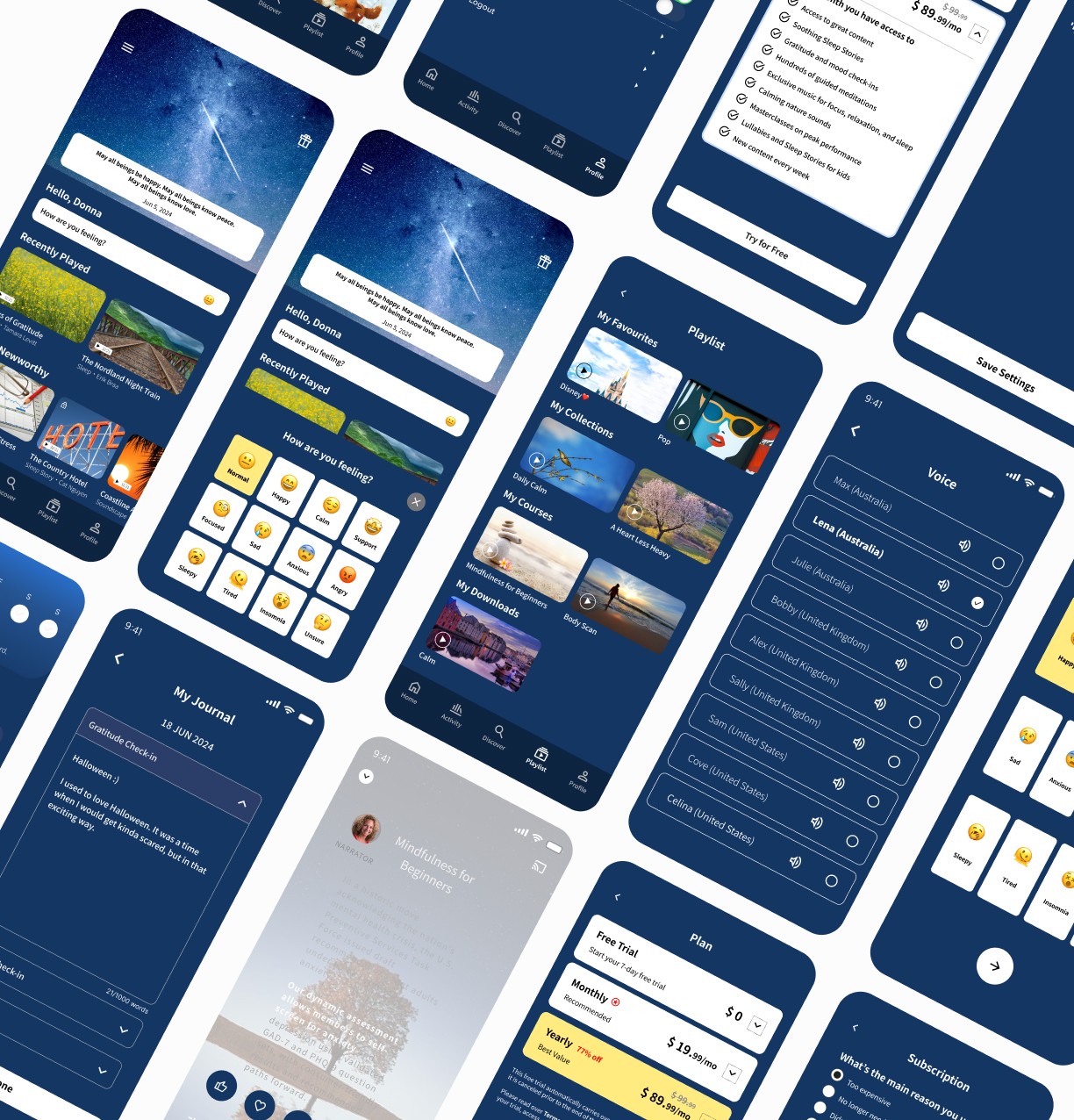
Many users struggled with navigation, found the subscription and auto-renewal process confusing, and expressed a strong need for more personalisation.
Many users struggled with navigation, found the subscription and auto-renewal process confusing, and expressed a strong need for more personalisation.
01. Discover
Secondary research
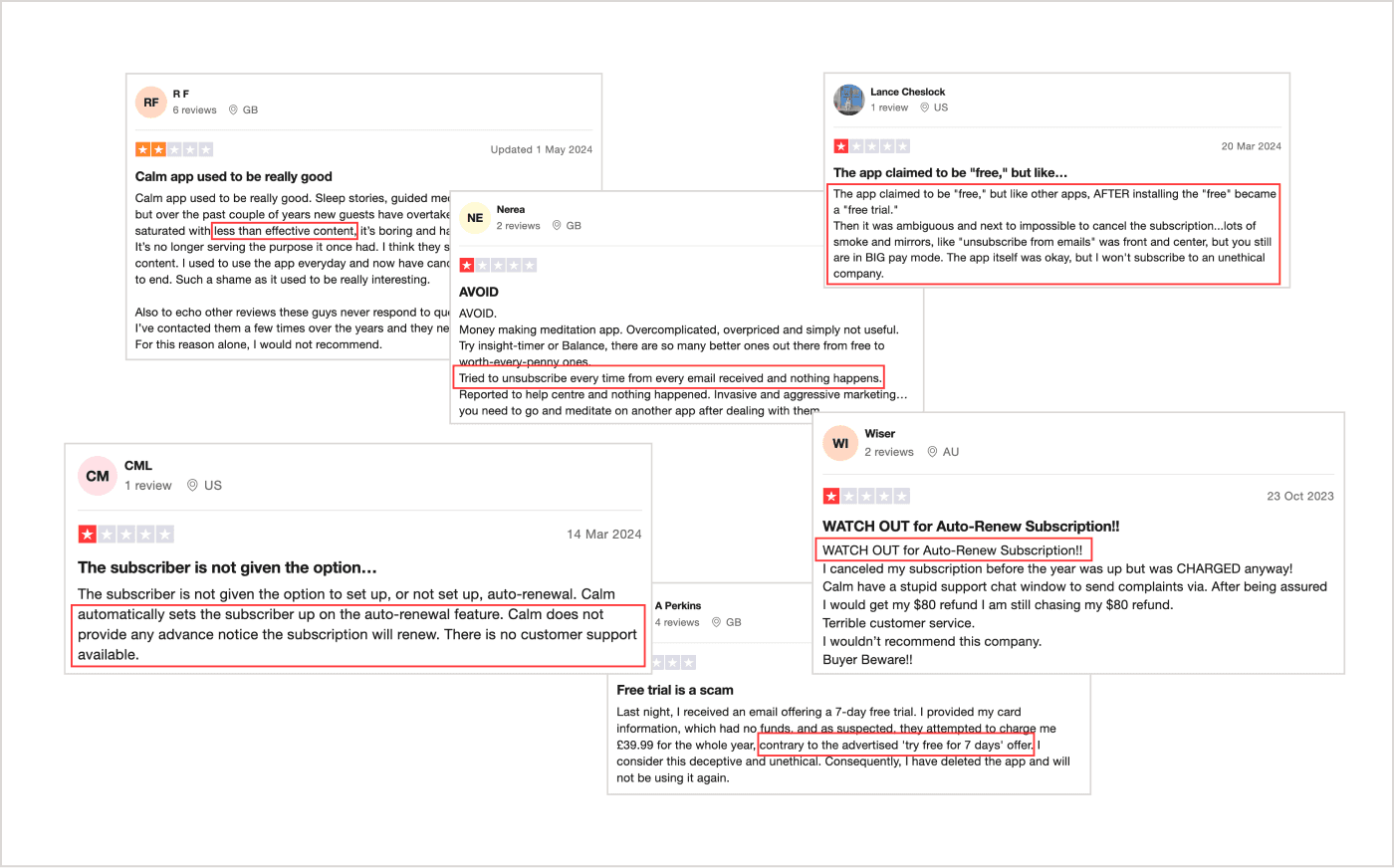
Feedback from real users shaped the problem space by exposing common users frustrations and unmet expectations early in discovery.
Feedback from real users shaped the problem space by exposing common users frustrations and unmet expectations early in discovery.
“What if Calm could sense when users were stressed or overwhelmed and proactively offered the right support at the right moment?”
“What if Calm could sense when users were stressed or overwhelmed and proactively offered the right support at the right moment?”
“What if Calm could sense when users were stressed or overwhelmed and proactively offered the right support at the right moment?”
“What if Calm could sense when users were stressed or overwhelmed and proactively offered the right support at the right moment?”
Competitor analysis
Looking into direct competitors like Headspace and MyfitnessPal helped uncover useful UX patterns, personalisation options and pricing models to build on.
Looking into direct competitors like Headspace and MyfitnessPal helped uncover useful UX patterns, personalisation options and pricing models to build on.
Looking into direct competitors like Headspace and MyfitnessPal helped uncover useful UX patterns, personalisation options and pricing models to build on.
During the review, common pain points were picked up, which guided what to lean into, what to cut back and what to steer clear of in the redesign.
During the review, common pain points were picked up, which guided what to lean into, what to cut back and what to steer clear of in the redesign.
During the review, common pain points were picked up, which guided what to lean into, what to cut back and what to steer clear of in the redesign.
Direct competitors
Strong points
Weak points
Headspace
Educational animations
Very user-friendly
offers a free trial
Free content limitations
Expensive subscription
Cluttered interface
Strong points
Weak points
MyfitnessPal
Barcode scanner for easy food logging
Compatibility with other devices
Strong community support
Limited food logging options
Cluttered interface
Inconsistent user-generated content
Direct competitors
Strong points
Weak points
Strong points
Weak points
Headspace
Educational animations
Very user-friendly
offers a free trial
Free content limitations
Expensive subscription
Cluttered interface
Headspace
Headspace
Educational animations
Very user-friendly
offers a free trial
Educational animations
Very user-friendly
offers a free trial
Free content limitations
Expensive subscription
Cluttered interface
Free content limitations
Expensive subscription
Cluttered interface
MyfitnessPal
MyfitnessPal
Barcode scanner for easy food logging
Compatibility with other devices
Strong community support
Barcode scanner for easy food logging
Compatibility with other devices
Strong community support
Limited food logging options
Cluttered interface
Inconsistent user-generated content
Limited food logging options
Cluttered interface
Inconsistent user-generated content
Strong points
Weak points
MyfitnessPal
Barcode scanner for easy food logging
Compatibility with other devices
Strong community support
Limited food logging options
Cluttered interface
Inconsistent user-generated content
02. Define
How Might We
The questions were used to break down user pain points and come up with ideas that tackled real frustrations, all while staying true to the purpose.
The questions were used to break down user pain points and come up with ideas that tackled real frustrations, all while staying true to the purpose.
o1.
“How might we make the subscription and cancellation process clear and transparent to prevent user frustration?”
o2.
“How might we simplify the interface and improve search so users can quickly find what they’re looking for?”
o3.
“How might we create meditation video scripts to make the app more inclusive and accessible for all users?”
03. ideate
Wireframe
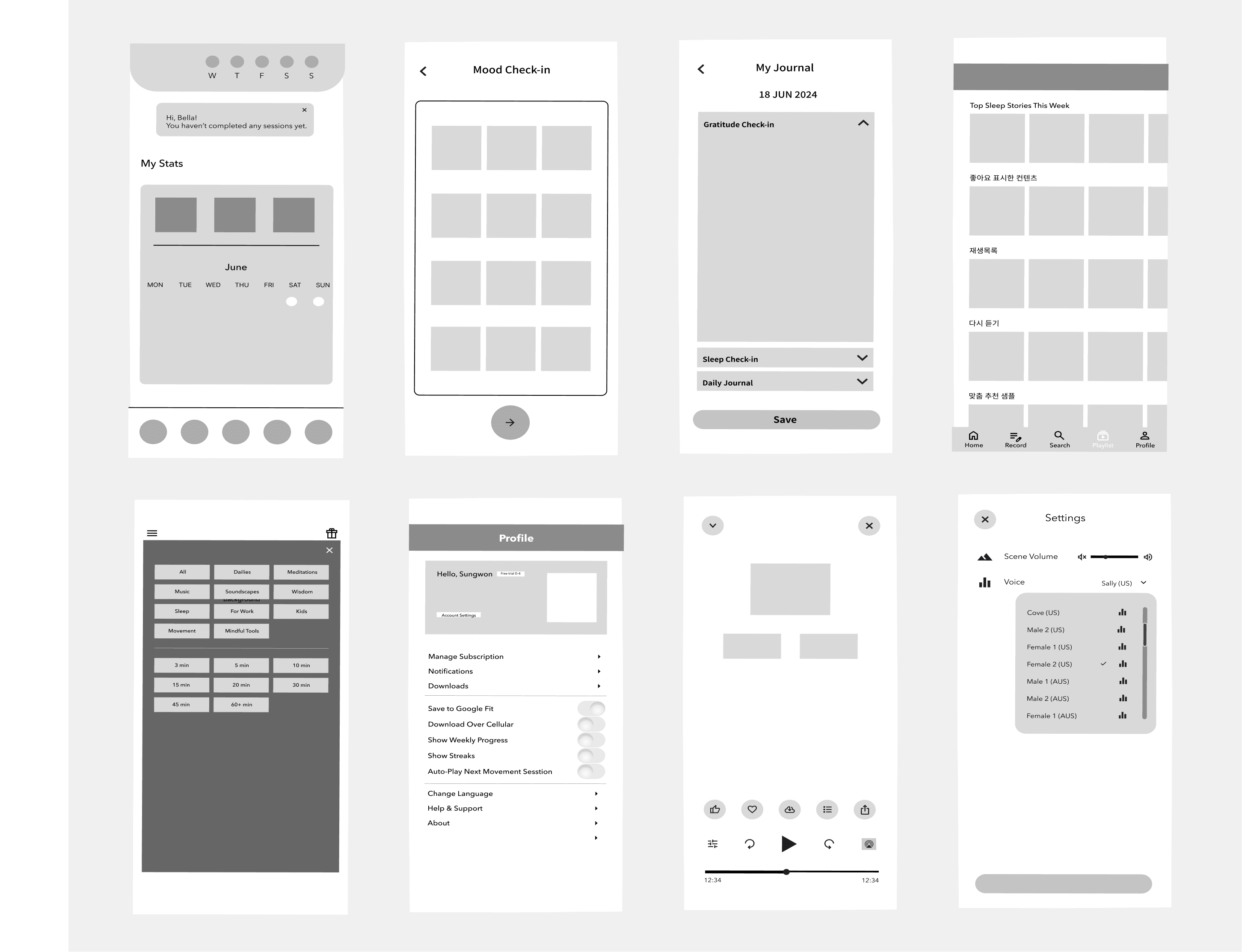
The structure and layout of key screens were mapped out to provide a clear visual guide for design elements and interactions. This foundation set up the overall flow and functionality of the app before moving on to more detailed design stages.
The structure and layout of key screens were mapped out to provide a clear visual guide for design elements and interactions. This foundation set up the overall flow and functionality of the app before moving on to more detailed design stages.
04. UI
Style guide
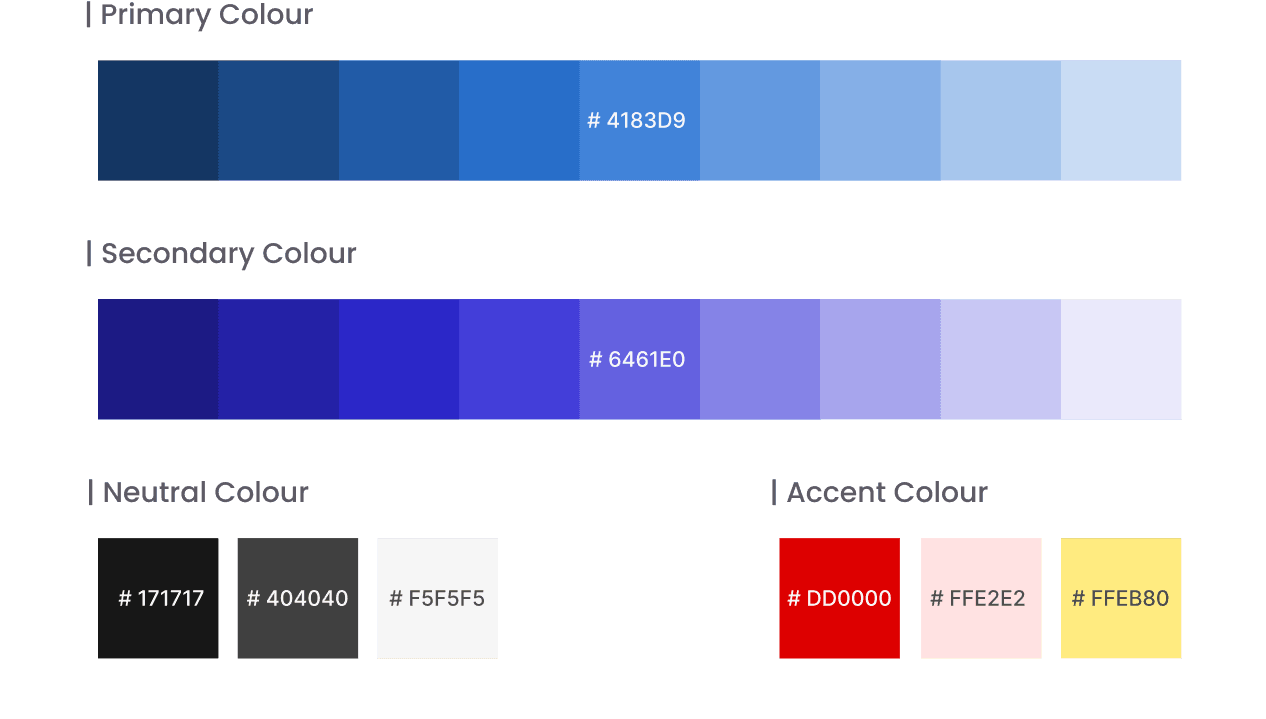
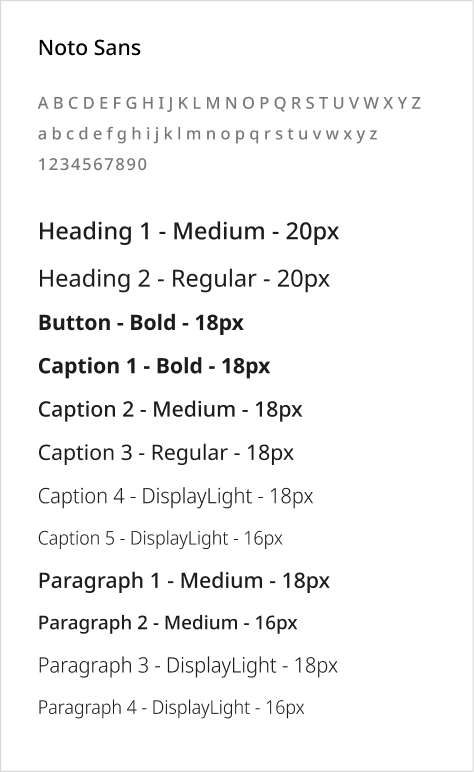
While keeping Calm’s original primary colour “Navy-ish”, Purple was added as a secondary colour to make the interface feel more vibrant and calming. Additionally, the original font was switched to “Noto Sans”, which has a clean, modern and neutral vibe, enhancing readability for a new script feature.
While keeping Calm’s original primary colour “Navy-ish”, Purple was added as a secondary colour to make the interface feel more vibrant and calming. Additionally, the original font was switched to “Noto Sans”, which has a clean, modern and neutral vibe, enhancing readability for a new script feature.
Hand-off
The bottom navigation was refined by replacing the unused “Premium” tab with a more relevant “Playlist” one. “Activities” button was also created to allow users to access personal stats and their journal in one place.
The bottom navigation was refined by replacing the unused “Premium” tab with a more relevant “Playlist” one. “Activities” button was also created to allow users to access personal stats and their journal in one place.
Home
Activity
Discover
Playlist
Profile
05. validate
Redesign in action
The redesign focused on creating a calm, simple and effortless experience. Each interface decision reduced cognitive load to support a smooth flow, helping users unwind, not feel on edge.
The redesign focused on creating a calm, simple and effortless experience. Each interface decision reduced cognitive load to support a smooth flow, helping users unwind, not feel on edge.
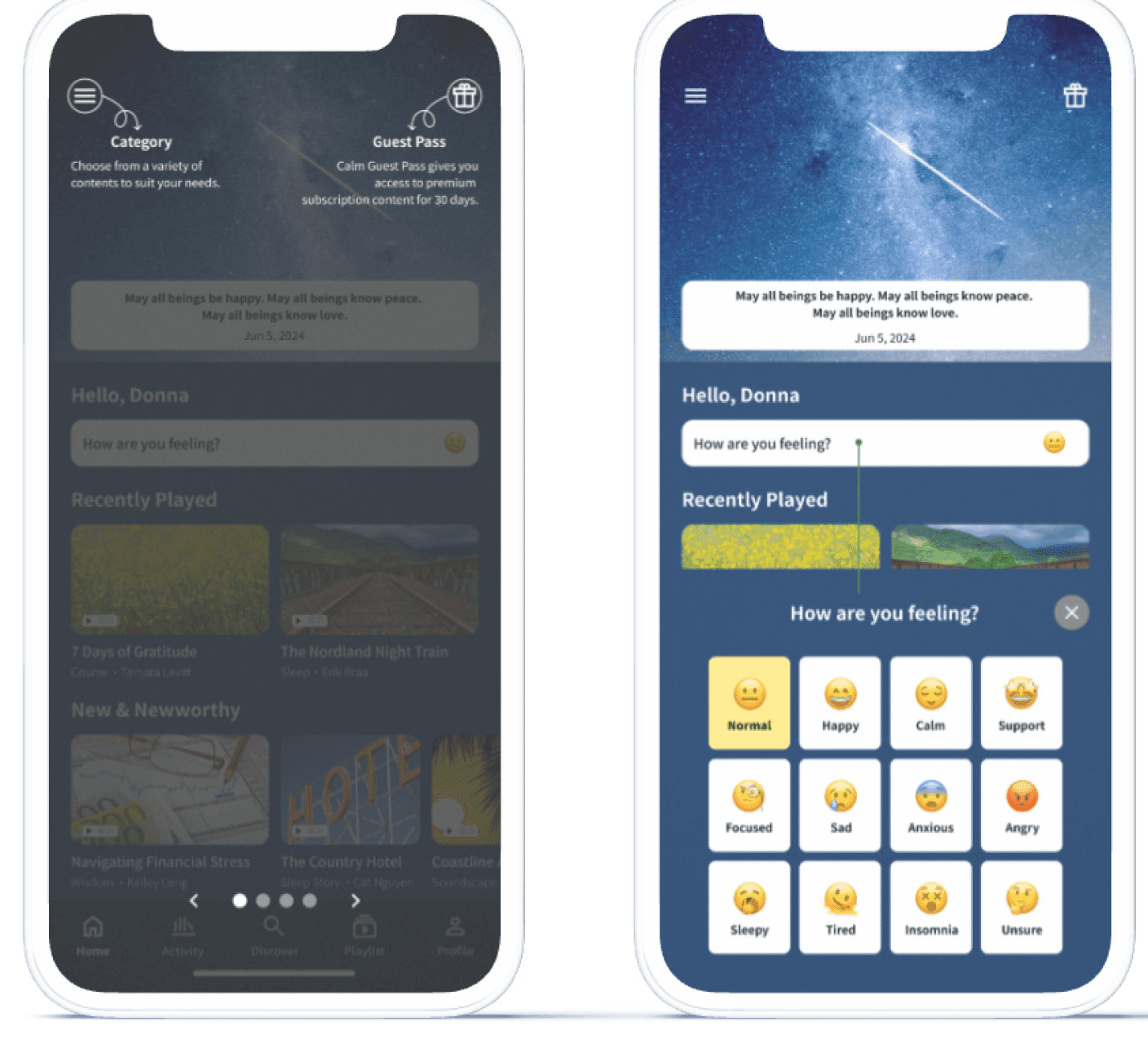
The home screen update adds quick tutorials for new users and expands mood check-in options, making the app more welcoming and emotionally inclusive.
The home screen update adds quick tutorials for new users and expands mood check-in options, making the app more welcoming and emotionally inclusive.
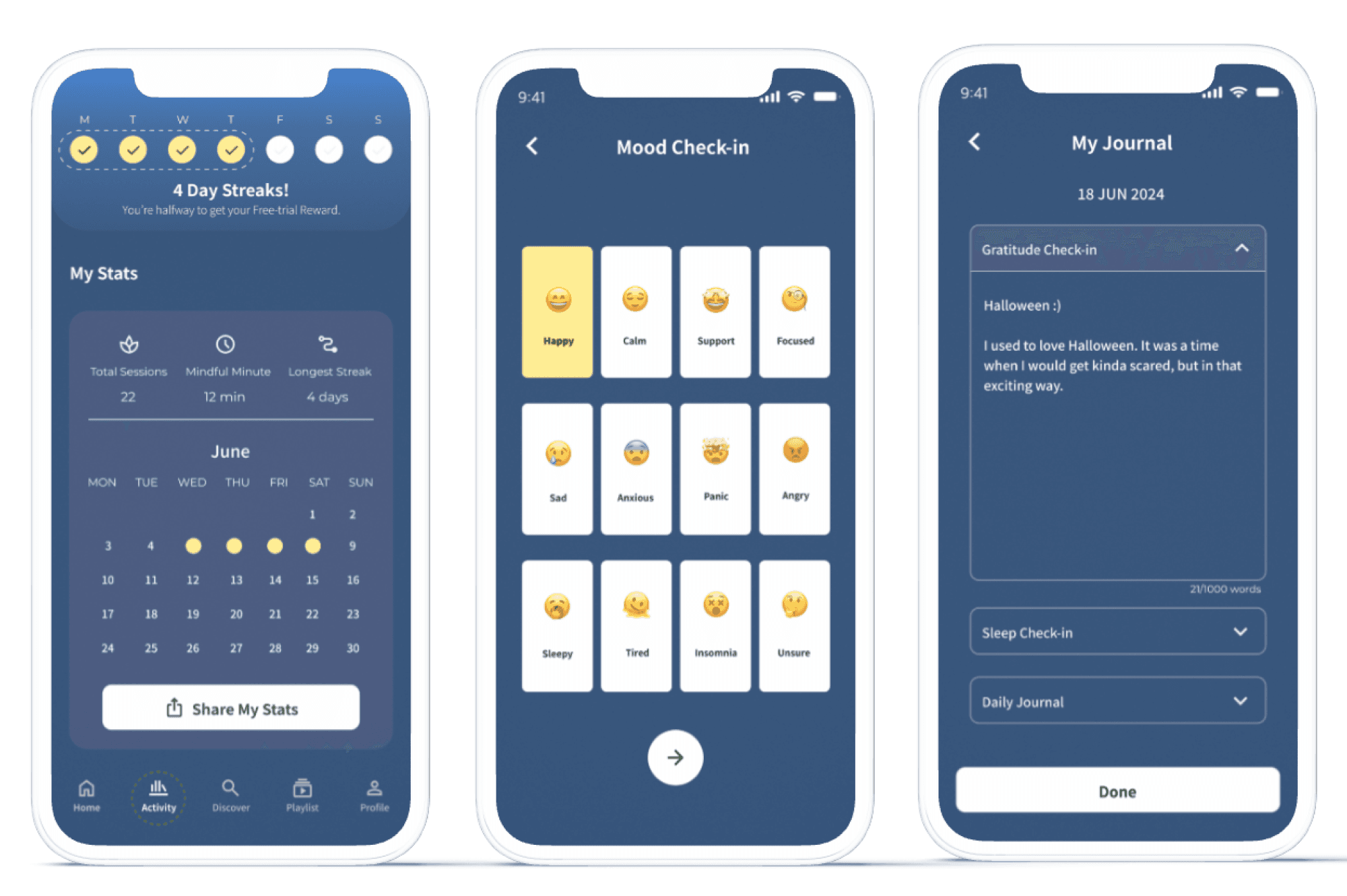
A streak tracker encourages habit-building with free trial rewards. Mood check-ins and personal journaling help users reflect on emotions and track their growth.
A streak tracker encourages habit-building with free trial rewards. Mood check-ins and personal journaling help users reflect on emotions and track their growth.
The home screen update adds quick tutorials for new users and expands mood check-in options, making the app more welcoming and emotionally inclusive.
A streak tracker encourages habit-building with free trial rewards. Mood check-ins and personal journaling help users reflect on emotions and track their growth.
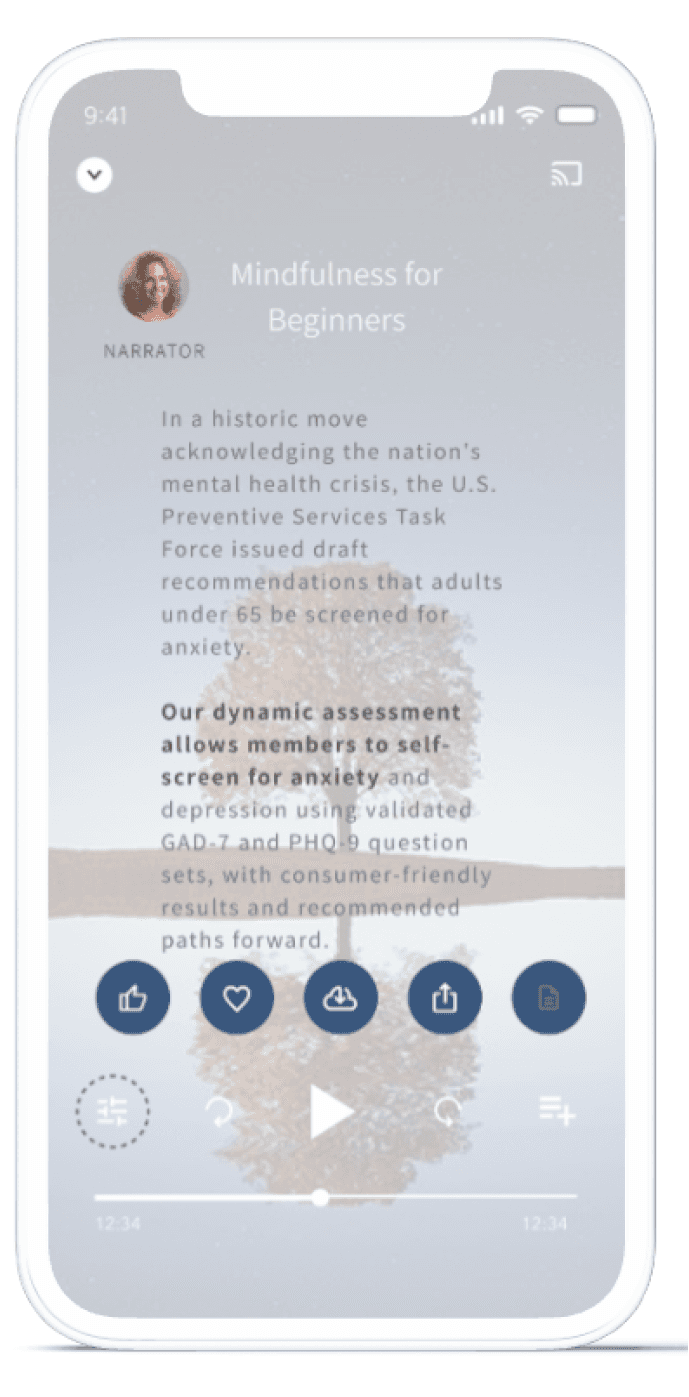
A script feature was introduced for meditation videos to support users with hearing impairments or lower comprehension.
A script feature was introduced for meditation videos to support users with hearing impairments or lower comprehension.
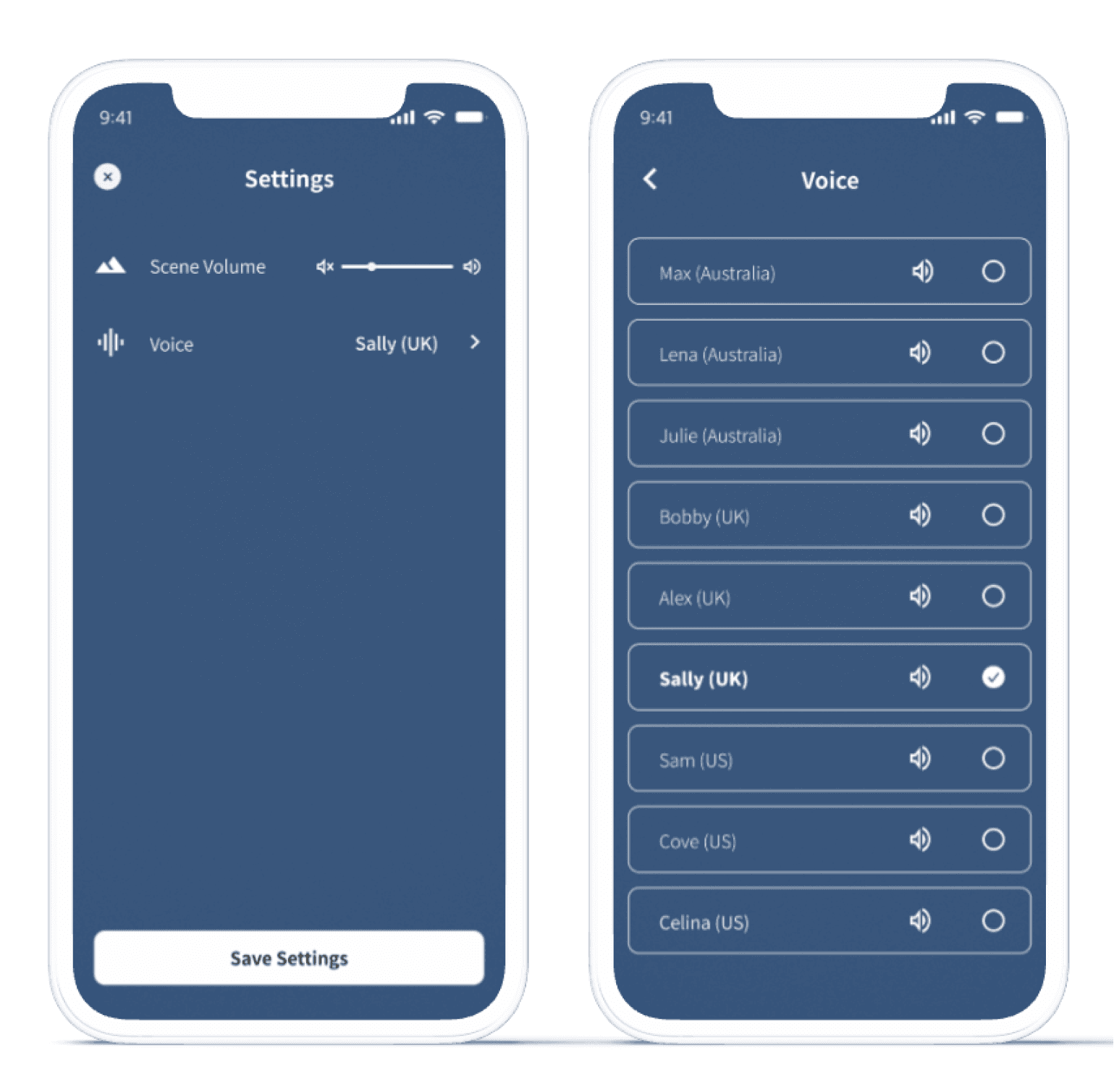
Limited voice options previously restricted the listening experience, but a wider range of accents has since been introduced to offer more personalisation and comfort.
Limited voice options previously restricted the listening experience, but a wider range of accents has since been introduced to offer more personalisation and comfort.
A script feature was introduced for meditation videos to support users with hearing impairments or lower comprehension.
Limited voice options previously restricted the listening experience, but a wider range of accents has since been introduced to offer more personalisation and comfort.
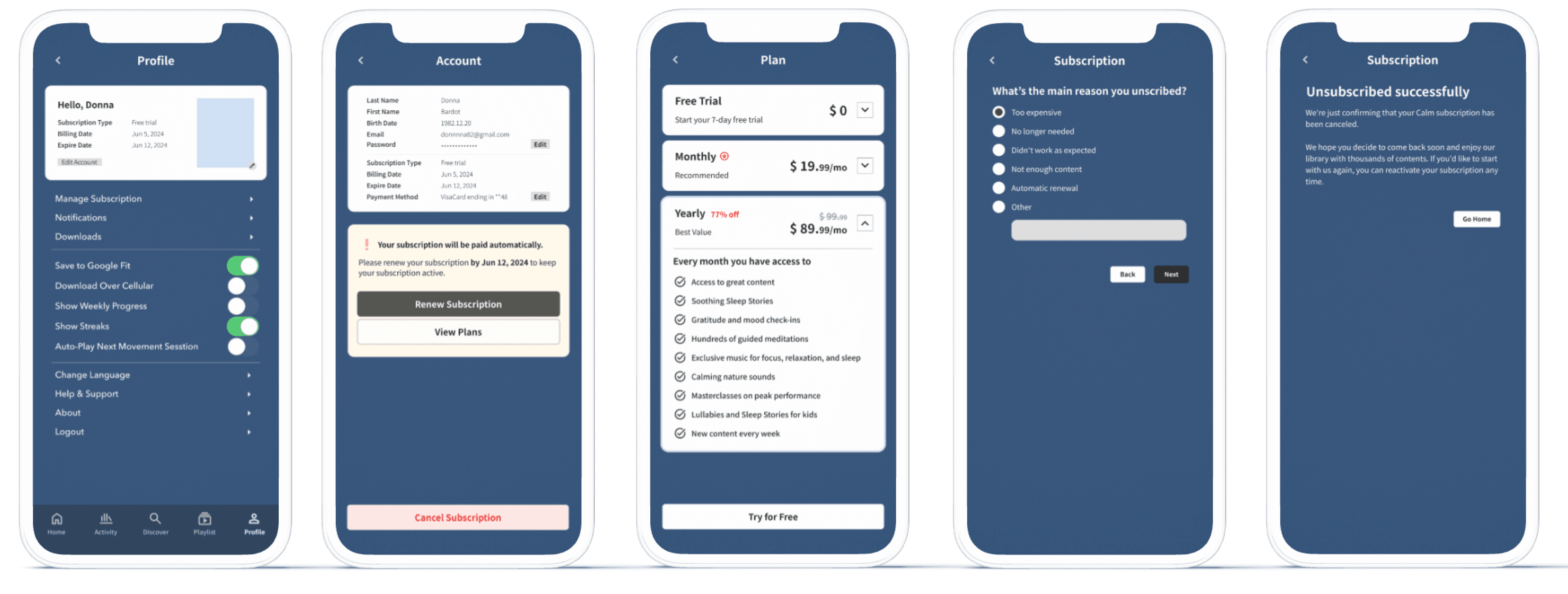
To resolve user frustration around subscription management, the redesign introduced a dedicated in-app flow for handling all aspects of subscriptions without needing to leave tha app.
To resolve user frustration around subscription management, the redesign introduced a dedicated in-app flow for handling all aspects of subscriptions without needing to leave tha app.
To resolve user frustration around subscription management, the redesign introduced a dedicated in-app flow for handling all aspects of subscriptions without needing to leave tha app.
User testing
Sample tasks given to participants:
Sample tasks given to participants:
01. Can you find and complete a mood check-in?
01. Can you find and complete a mood check-in?
02. Please locate the journaling feature and write a short entry.
02. Please locate the journaling feature and write a short entry.
03. Can you change the meditation voice to a different accent?
03. Can you change the meditation voice to a different accent?
One participant mentioned that completing the mood check-in was easy and quick, confirming home screen and flow felt more intuitive.
One participant mentioned that completing the mood check-in was easy and quick, confirming home screen and flow felt more intuitive.
However, two users hesitated while locating the journaling feature after finishing the check-in. This indicated the need for clearer visual hierarchy or a stronger link between mood logs and journaling.
However, two users hesitated while locating the journaling feature after finishing the check-in. This indicated the need for clearer visual hierarchy or a stronger link between mood logs and journaling.
Next steps
Revisit layout and spacing to help users quickly spot key actions like writing journal entries or switching meditation voices.
Revisit layout and spacing to help users quickly spot key actions like writing journal entries or switching meditation voices.
Add lightweight tutorials or smart nudges to help guide new users without overwhelming them.
Add lightweight tutorials or smart nudges to help guide new users without overwhelming them.
Simplify how users move from mood check-ins to journaling. This could mean adding a direct prompt after logging a mood or grouping both features more clearly on the home screen.
Simplify how users move from mood check-ins to journaling. This could mean adding a direct prompt after logging a mood or grouping both features more clearly on the home screen.
Review readability, tap targets and script availability for diverse user needs, especially for users with hearing or cognitive challenges.
Review readability, tap targets and script availability for diverse user needs, especially for users with hearing or cognitive challenges.
More to explore
Check out other works
More to explore
Check out other works

More to explore
Check out other works